UI Builder for Microsoft Access
Feature Detail: Predefined Menu Commands & Navigation Actions
UI Builder offers over 26 distinct menu commands out of the box—four times the command capabilities found in the standard Microsoft Access Switchboard Manager.
Why spend valuable time hand-writing repetitive VBA macros when battle-tested, professional menu actions are already pre-built? Configure modern navigation with the click of a button.
Form & Data Commands
- Open forms in Add-Only mode
- Open forms in Read-Only mode
- Open forms in separate popout windows
- Open forms dynamically as subforms
- Filter forms by predefined SQL/query criteria
- Add, copy, or delete records on linked subforms
- Print active screen and record views
- Trigger automated record search dialogs
Microsoft Office Integration
- Create Outlook Tasks from Access data
- Mail merge directly to Outlook formatted emails
- Automate mail merge documents in Microsoft Word
- Generate single or bulk Outlook email drafts
- Surface synchronized contact details across Office
Advanced System & Developer Commands
- Launch external documents, PDFs, and files
- Export table and query datasets to Excel or CSV
- Execute custom VBA functions and macros safely
- Run action queries with automated parameter handling
- Log administrative events and errors on click
- Dynamic button security based on active user roles
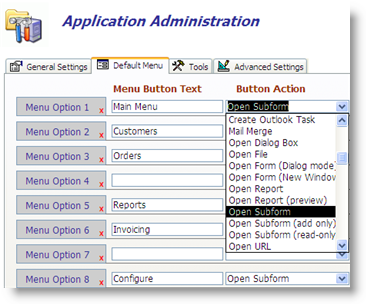 Click image to enlarge
Point-and-Click Menu Administration
Assigning actions in UI Builder requires zero coding. Choose your button label, select your target form or report, pick one of 26+ predefined commands, and let UI Builder handle the underlying VBA event wiring automatically.
« Return to All UI Builder Features