You are browsing your tables in Microsoft Access when suddenly you notice a list of greyed-out tables with names starting with MSys.... Fear not — these are not malware or corrupt add-ins.
These are Microsoft Access System Tables. Typically hidden in the background, they contain vital structural metadata required for the Access database engine to run.
Showing & Hiding Access System Tables
MSys tables, as doing so can permanently corrupt database schema integrity.
Access 2007, 2010, 2013, 2016, 2019 & Microsoft 365
- Right-click the top header bar of the Navigation Pane.
- Click Navigation Options... from the context menu.
- In the Display Options area, check or un-check Show System Objects.
- Click OK to apply changes.
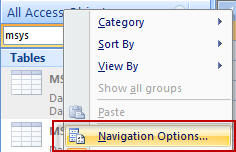 Click to enlarge
Legacy Access (2000, 2002 / XP, and 2003)
- Select Tools > Options from the top menu bar.
- In the Options dialog, select the View tab.
- Under the Show section, check or un-check System objects.
 Click to enlarge
What Does Each System Table Do?
- MSysObjects
- The master directory of the database. Contains one row for every table, query, form, report, macro, module, and linked data source in the database.
- MSysQueries
- Stores internal query definitions, parsed SQL components, joins, and output parameters indexed by
ObjectID. - MSysRelationships
- Stores table relationship configurations, foreign keys, and referential integrity constraints defined via the Relationships window or DAO.
- MSysIMEXSpecs & MSysIMEXColumns
- Store saved Import/Export specifications and column-level mapping definitions for flat files, CSVs, and Excel imports.
- MSysAccessObjects
- Internal repository tracking form and report design controls and property states.
MSysObjects Object Type Matrix
The Type column in MSysObjects identifies the specific classification of each database asset:
| Type Column Value | Database Object Type |
|---|---|
| 1 | Local Table |
| 4 | Linked Table (ODBC / SQL Server / MySQL) |
| 5 | Query (Select, Action, Union) |
| 6 | Linked Table (Access / Excel / Text) |
| -32768 | Form |
| -32764 | Report |
| -32766 | Macro |
| -32761 | VBA Module |
| 2, 3, 8 | Access Reserved System Internal |
Using System Tables in Your Databases
Querying MSysObjects directly provides a lightning-fast way to retrieve object catalogs without complex DAO/VBA loops.
For example, to populate a custom combo box or dropdown form control with all user-created Reports, set the control's RowSource property to:
Left([Name], 1) <> "~"?Access creates temporary system artifacts and working query definitions prefixing with a tilde (
~). Excluding these ensures users only see actual database reports.